 Alfred
Alfred prepares the work. You approve it.
Every hour Alfred reads what has come in, links it to the right client, files it and prepares what needs doing. It all starts from one thing: knowing your business.
Your business's «second brain»
Alfred keeps together everything that usually lives in the owner's head: who every client is, open projects, quotes, suppliers, trusted people. It starts from what you already have: your CRM in Excel, client records, project folders, contacts.
- Imports contacts and projects from Excel, CSV and your records.
- Learns your way of writing from how you correct texts.
- Learns your rules from a single sentence: «never write to Rossi on Saturdays».
- Keeps records up to date by itself: dated notes, next step, last contact.
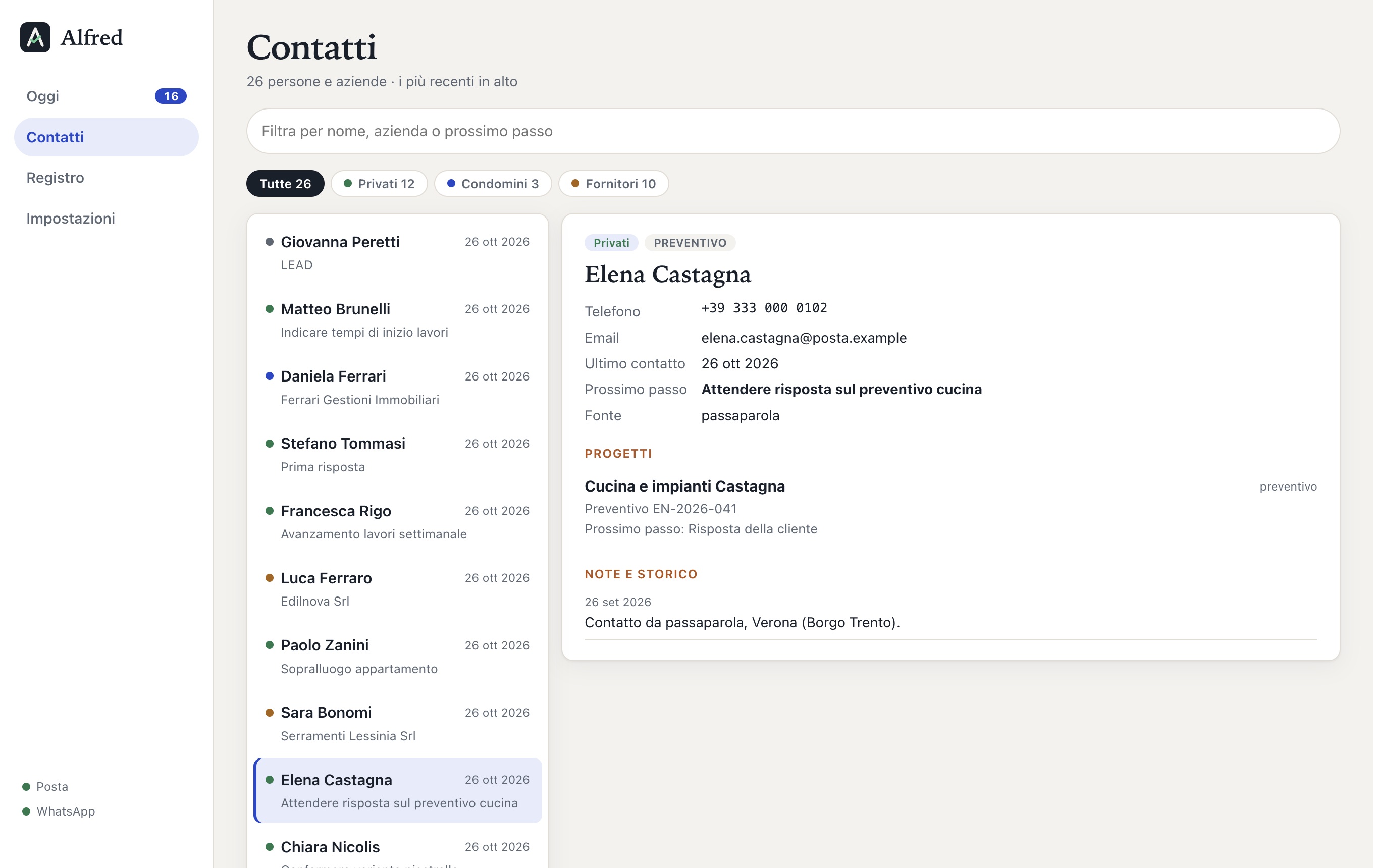
A client record: project, quote, next step, history. Sample data.
The complete history of every client, in one place
Every email, every WhatsApp, every voice note and every call transcript from a client goes into their diary, in date order. For each entry you find the original words, what Alfred understood (even when the voice note was muddled), key dates and figures, and the points to clarify.
Photos, plans, PDFs and attachments are saved in the client's folder with the date in front. Messages from colleagues and the technical office that cover several projects are sorted into the right diary too.
- Find who said what, and when, in a minute.
- You notice straight away if information is missing or something doesn't add up.
- Nothing is deleted: corrections are added.
Example with invented data.
On your computer and in the cloud, organised your way
The archive is made of ordinary folders and files: you can open them with any program, even without Alfred.
- The folders live on your computer; if you sync them with Google Drive (or a similar service) you also have a copy in the cloud, for extra safety.
- We decide the structure together at the start: by client, by area, by year, with your job codes.
- If you already have an archive, Alfred uses it as it is and only adds the diary and the new files.
- File names start with the date: they sort themselves and are easy to search.
You talk to the client. Alfred takes notes, and does the homework.
Give Alfred the call transcript, or dictate a voice note about what you discussed, with the client's name in the title. Alfred reads it on your computer, links it to the client and, looking at their record and the documents in their folder, prepares:
- a summary of what you discussed;
- a PDF with the next steps, to send to the client;
- the messages for the client and, if you asked for it during the call, for your colleagues;
- the appointments you set, already in the calendar;
- the promises made, with their deadlines.
Call with Marco Rigo, 12 minutes
«…I'll send you the window measurements on Friday, and Thursday at nine works for the site visit…»
Written the way you would write them
For every message that needs a reply, Alfred prepares the text taking into account the client's history, open quotes, your commitments and your style. You see it next to the message received, with the reason.
- Send and it goes, from your email or your WhatsApp.
- Edit and Alfred learns from the correction.
- Later and it comes back when you want.
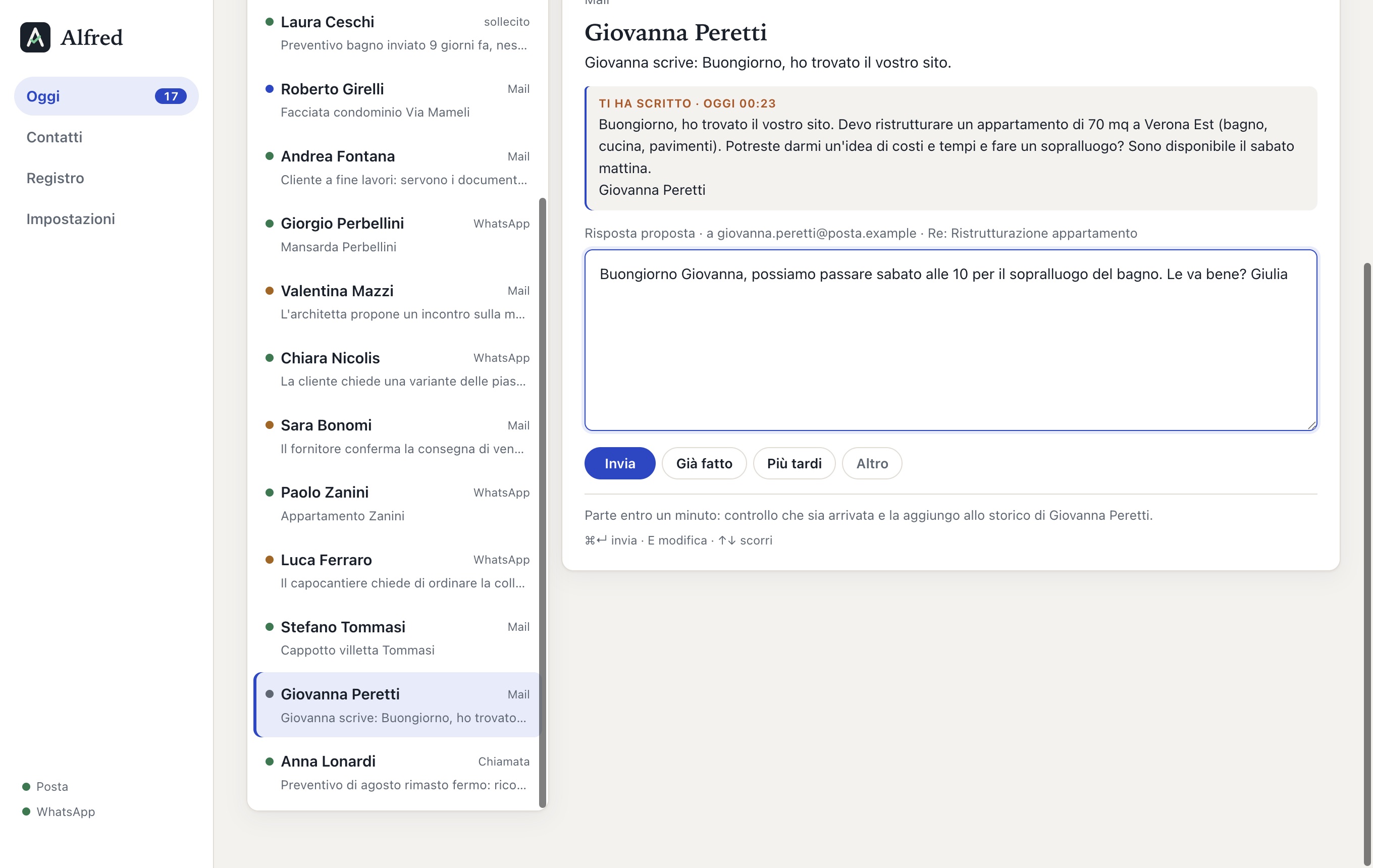
A proposed reply, corrected before sending. Sample data.
It only suggests times when you are really free
When a client asks for a site visit, a viewing or a call, Alfred looks at your calendar and the appointments already set, and finds the free slots: on the days and in the hours you choose, with a margin before and after other commitments.
- In the reply it suggests two options, on different days.
- If the client asked for «the afternoon» or «after 5 pm», it picks the ones that fit.
- When the client confirms, the appointment goes into the calendar and the reminder goes out the day before, if you have switched it on.
Example with invented data.
You decide the autonomy, one thing at a time
Nothing goes out without your OK, until you decide otherwise. Routine tasks can be handed to Alfred: we choose them together and you switch them on one by one in the settings. Every automatic action stays in the log.
Important communications
Replies to clients, quotes, follow-ups, documents: always with your approval.
Agreed routine
- confirmed appointments in the calendar
- first reply to a new contact
- «material received, thank you»
- reminder the day before
- regular check-in
News and problems
An important email, a client who doesn't reply, a connection to restore: you know straight away, never in silence.
Reminders and follow-ups
Promises made in emails, chats and calls become deadlines. On the right day it reminds you of yours; if a client hasn't sent what they promised, the follow-up is ready.
Calendar
An appointment confirmed in a chat, an email or a call transcript goes by itself into the dedicated «Alfred» calendar, next to yours.
Log
What Alfred did, day by day: messages sent, files saved, problems. So you can check at any time.
Work groups
In the WhatsApp groups of the site or the team, Alfred follows what concerns you and lets you know. Friends and family groups are left alone.
To the right person
An order that arrived on WhatsApp goes to the orders office, by email. Alfred learns from your conversations who handles what, and prepares the message for them.
With attachments
Photos, PDFs and plans go out with the message. Before sending, you open them with one click and check they are the right ones.
Ask a question, as you would a colleague
From the bar at the top, ask anything about your clients and projects, by typing or by voice: press the microphone, speak, and Alfred understands. Your voice is transcribed on your computer, like WhatsApp voice notes.
Alfred searches messages, calls, records, the calendar and the documents in your folders (plans and PDFs too), thinks it through and answers, saying where the information comes from.
- «What's missing for the Rossi quote?»
- «When am I free on Thursday for the site visit?»
- «Draft a message for the window supplier.»
Example with invented data.
It connects to what you already use
You don't have to change tools or habits. Here is what already works and what is coming in the next months.
- Gmail and Google Workspacetoday
- Outlook and Microsoft 365coming
- Other mailboxes (IMAP)coming
Calendar
- Google Calendartoday
- Outlook and Microsoft 365coming
- iCloud Calendarcoming
Messages and voice
- WhatsApp Businesstoday
- Transcribed WhatsApp voice notestoday
- Voice Memos and recordingstoday
Archive
- Folders on your computertoday
- Google Drive, Dropbox, OneDrive, iCloud Drivetoday
- Excel and CSV for contactstoday
Management software and CRM
- Alfred's built-in CRMtoday
- Odootoday
- Your company's CRM or management softwareon request
Computer
- Mactoday
- Windowscoming
Commands
- Search bar and questionstoday
- Voice commandstoday
Cloud archive: Alfred writes into ordinary folders; if those folders are synced with Google Drive, Dropbox, OneDrive or iCloud Drive, you automatically have a copy in the cloud too.
Want to see it live?
In 20 minutes we show you everything with a sample business.